
Download ReadLater – AI Article Summarizer, Fast Reading, Organized Notes
Overview
In a world where information moves faster than we can read, ReadLater.ai emerges as a practical, web‑based AI article summarization tool that helps users capture the essence of any online piece in seconds. By simply pasting a URL, the platform leverages advanced natural‑language processing to generate concise, coherent summaries that retain the core ideas, arguments, and key data points of the original article. This service is especially valuable for busy professionals, students, and avid readers who need to stay informed without spending hours scrolling through long‑form content.
ReadLater.ai does more than just summarize. Its clean, intuitive interface lets you organize saved articles into custom folders, tag them for quick retrieval, and even share both the original link and the AI‑generated summary with colleagues or friends. While a free tier offers essential summarization capabilities, a subscription unlocks premium features such as bulk URL processing, advanced customization of summary length, and integration with popular note‑taking apps.
Security and privacy are baked into the platform: URLs are processed over encrypted HTTPS connections, and no personal data is stored beyond what you explicitly save in your account. Whether you’re researching market trends, catching up on tech news, or curating reading lists for a class, ReadLater.ai provides a fast, reliable, and secure way to turn information overload into actionable knowledge.
Key Features of ReadLater.ai
- One‑Click Summarization: Paste any article URL and receive a concise summary within seconds.
- Adjustable Summary Length: Choose short, medium, or detailed summaries to match your time constraints.
- Folder & Tag System: Organize saved articles with custom folders and tags for instant retrieval.
- Bulk URL Import: Subscription users can upload CSV files with multiple URLs for batch summarization.
- Shareable Output: Copy both the summary and original URL for easy sharing on social media, email, or collaboration tools.
- Cross‑Platform Access: Web‑based design works on any modern browser, from Chrome to Safari.
- Integration Hooks: Connect with Evernote, Notion, and Google Docs via Zapier for seamless workflow automation.
- Secure Data Handling: All communications are encrypted; personal reading lists are stored privately.
- Customizable Appearance: Light and dark mode options keep the interface comfortable for all users.
- Free Tier & Premium Plans: Start for free, upgrade for advanced features and higher usage limits.
Installation & Usage Guide
Because ReadLater.ai is a cloud‑based service, there is no traditional “installation” process—just a web browser and an internet connection. Follow these simple steps to start summarizing articles immediately:
- Create an Account: Visit ReadLater.ai and click “Sign Up.” You can register using an email address or through Google/Facebook OAuth for faster onboarding.
- Verify Your Email: A verification link will be sent to your inbox. Click it to activate your account and unlock the free summarization quota.
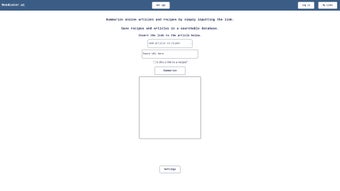
- Navigate to the Dashboard: After login, you’ll land on the main dashboard where a prominent “New Summary” field awaits your URL.
- Enter a URL: Paste any publicly accessible article link (e.g., a news story, blog post, research paper) into the input box. Select your desired summary length from the dropdown menu.
- Generate the Summary: Click “Summarize.” Within 2–5 seconds, the AI engine returns a crisp paragraph (or longer, depending on your setting) that captures the article’s main points.
- Save & Organize: Click “Save” to add the summary to your library. Assign it to a folder (e.g., “Tech News,” “Research”) and add tags for future searching.
- Share or Export: Use the “Copy Summary” button to paste it into emails or messaging apps, or click “Export to Notion/Evernote” if you have integrated those services.
- Upgrade if Needed: If you regularly summarize large batches of URLs, consider the Pro plan for bulk upload, higher daily limits, and priority processing.
The platform also offers a handy mobile‑optimized view, so you can generate and manage summaries on tablets or smartphones without any additional app download. For power users, the settings menu provides control over language model preferences, default folder locations, and notification preferences.
Compatibility, Performance, and Pros & Cons
ReadLater.ai runs entirely in the cloud, meaning it is compatible with any operating system that supports a modern web browser—Windows, macOS, Linux, Chrome OS, Android, and iOS alike. Tested on the latest versions of Chrome, Edge, Firefox, Safari, and even mobile browsers, the service maintains consistent speed and layout fidelity across devices. Because no local software is installed, there are no system‑level conflicts, and updates happen automatically on the server side.
Pros
- Instant, AI‑driven summarization eliminates the need to read full articles.
- Web‑only architecture ensures universal compatibility and zero installation hassle.
- Robust organization tools (folders, tags, bulk import) keep reading lists tidy.
- Secure HTTPS transmission and private storage protect user data.
- Free tier provides generous daily limits for casual users.
- Integrations with popular productivity apps streamline workflow.
- Customizable summary length adapts to different reading contexts.
- Responsive design works well on both desktop and mobile devices.
Cons
- Advanced features (bulk upload, API access) are locked behind a paid subscription.
- Summaries may occasionally miss nuanced arguments in highly technical papers.
- Reliance on an internet connection; offline usage is not possible.
- Limited language support beyond English in the current version.
- Free tier imposes a modest daily URL limit, which may be restrictive for heavy researchers.
Overall Rating: 4.5/5 – ReadLater.ai delivers fast, accurate summaries and a smooth user experience, making it a valuable addition to any knowledge‑worker’s toolkit.
FAQ & Final Thoughts
Is ReadLater.ai really free to use?
Yes, there is a free tier that allows up to 10 article summaries per day. This is sufficient for casual readers. For higher volume or premium features, you can upgrade to a paid plan.
How secure is my data on ReadLater.ai?
All data transmission is encrypted via HTTPS, and your saved articles are stored in a private, password‑protected account. The service does not share your reading history with third parties.
Can I use ReadLater.ai on mobile devices?
Absolutely. The web interface is fully responsive, and you can access all features from iOS or Android browsers without installing a separate app.
What languages does the summarizer support?
Currently the AI model is optimized for English content. Multilingual support is planned for a future release.
Is there an API for developers?
Yes, premium subscribers gain access to a RESTful API that allows programmatic summarization and bulk processing. Documentation is available in the account dashboard.
Final Verdict: ReadLater.ai stands out as a fast, secure, and user‑friendly AI summarizer that transforms the way you consume online content. Its web‑only design guarantees cross‑platform compatibility, while the robust organization tools keep your reading list tidy and searchable. Whether you’re a student racing against deadlines or a professional needing to skim industry news, the free tier offers enough power to get started, and the premium plans scale gracefully as your needs grow. Give ReadLater.ai a try today—save time, stay informed, and keep your knowledge base organized with just a few clicks.
Start summarizing for free now and experience the convenience of AI‑driven reading.



.png)



